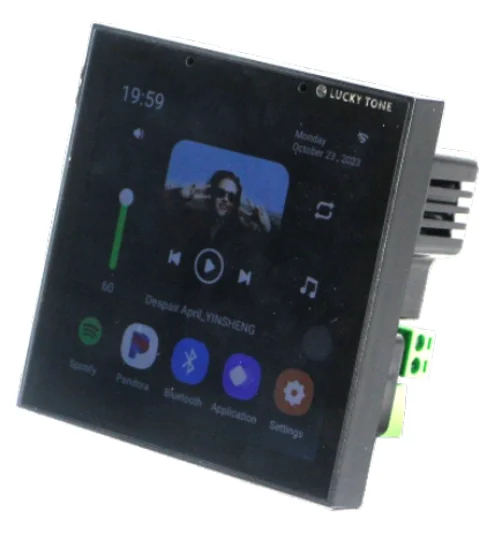
A 4″ Android touch screen with a 2 × 25 W amplifier, Bluetooth, USB / TF and RS485, in black, used as a smart home controller for audio and devices.
At a glance
- 4″ screen, Android.
- 2 × 25 W amplifier.
- Bluetooth, USB / TF, RS485.
- Colour: black.
How does the control screen work?
The control screen is the wall-mounted face of the smart home. Models with a built-in gateway link wirelessly to switches, sensors, curtain motors and AC controllers over Zigbee or Bluetooth Mesh, and connect to the internet over Wi-Fi, so devices are controlled from the screen, the app and by voice.
“Scenes” are built on the screen: one touch runs a set of commands together, such as switching off the lights, closing the curtains and setting the AC at bedtime. Models with an amplifier play music straight to the ceiling speakers.
Related products
- NEXSW touch and button switches and NEXRE hidden switch modules.
- NEXSE / NEXSEN motion, presence and door sensors.
- NEXCURT curtain kits and NEXAC AC controllers.
- NEXSP ceiling speakers for models with an amplifier or music centre.
Technical data
| Item | Value |
|---|---|
| Brand | NEXSMART |
| Model | NEXSC-BA-4 |
| Type | 4″ Touch Screen with 2 × 25 W Amplifier |
| Connectivity | Bluetooth · RS485 |
| Amplifier | 2 × 25W |
The critical point: protocol and screen position
Make sure the devices you will link support the screen’s protocol (Zigbee or BLE Mesh). A central position in the home strengthens the link to the devices; avoid mounting it inside metal cabinets or behind thick walls.
General design notes
- Plan the screen at the living-room entrance or near the master bedroom, where it is used most.
- Prepare a back box and power at a comfortable height before finishing.
- Provide good Wi-Fi coverage at the screen position.
- Agree the scenes with the home owner before programming.
These are general notes
These points are general smart home installation practice, not taken from the NEXSMART datasheet. Electrical connections are made by a qualified electrician to the Saudi electrical code and the authority’s requirements.
Installation steps
- Choose the screen position and prepare the back box and power.
- Connect power and fix the screen to the wall (or the desk stand).
- Connect the screen to Wi-Fi and the app.
- Add the sub-devices one by one and name them by room.
- Build the scenes and test them with the home owner.
Common mistakes
- Buying devices on a protocol the screen does not support.
- Mounting the screen where coverage is weak.
- Giving devices generic names, which makes voice control hard.
- Not updating the screen software.
Inspection and maintenance
Update the screen and app software when updates are available, clean the screen with a soft dry cloth, and review the scenes when new devices are added.
Files and ordering
No datasheet for this model is on the site yet; ask us for it on WhatsApp. When ordering, state model NEXSC-BA-4 and the quantity.
How to buy
This product is sold directly in the Fu-Mech online store. If you would like to buy, press “Buy in store” at the top of the page to open its store page. For projects and large quantities, request a quote or contact us on WhatsApp.
Frequently asked questions
Do I need a separate gateway with the screen?
Models with a built-in gateway do not need a separate one; check the connectivity line in the technical data.
Does the screen work if the internet drops?
The NEXSC-B-10 datasheet states that lighting, curtains, sensors and AC stay controllable locally if Wi-Fi drops; for other models, check with us before ordering.
Can more than one screen be installed in a home?
Yes, a screen can be installed on each floor or wing and linked to the same app account.
References
- NEXSMART — Model data
- Zigbee 3.0 — Wireless standard of the Connectivity Standards Alliance
This page is general information to help with selection and purchase, taken from NEXSMART data. General points are common practice; the reference is the latest manufacturer data.