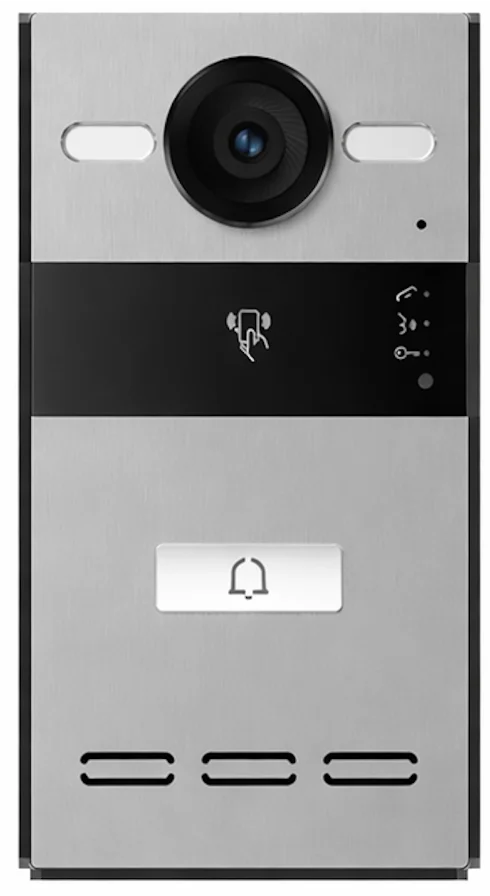
An outdoor intercom station for villas that integrates with the smart home screen, for audio and video with visitors and access control straight from the control screen.
At a glance
- 2MP camera, 1280 × 720 video.
- IP65 / IK08 protection.
- PoE (802.3af) or DC 12V / 2A power.
- SIP protocol, surface mounting.
How does the intercom station work?
The station is fitted at the outer door and connects to the home network by cable. When a visitor presses call, video and audio go to the smart home screen, so you talk to the visitor and open the door from the screen or the app. It uses SIP, so it integrates with other SIP devices.
Related products
- NEXSC-B-10 control screen (audio/video intercom).
- NEXRE-DC dry-contact module to link locks or gates.
Technical data
| Item | Value |
|---|---|
| Brand | NEXSMART |
| Model | S212 |
| Type | Outdoor Intercom Station for Villas |
| Connectivity | IP · SIP · PoE |
| Protection | IP65 / IK08 |
| Dimensions | 168 × 88 × 34 mm |
The critical point: compatibility and cabling
Confirm the station works with the control screen before ordering, and run the network cable (PoE preferred) to the station position before finishing.
General notes
- Mount the camera at a height that suits the visitor’s face.
- Avoid facing the camera into direct sunlight.
- Linking an electric door lock needs suitable wiring.
These are general notes
These points are general smart home installation practice, not taken from the NEXSMART datasheet. Electrical connections are made by a qualified electrician to the Saudi electrical code and the authority’s requirements.
Installation steps
- Set the station position and height.
- Run the network cable and power.
- Fix the station.
- Link it to the network and the control screen.
- Test calling and door opening.
Common mistakes
- Facing the camera into the sun.
- Not running a network cable before finishing.
- Buying a station without confirming it works with the screen.
Inspection and maintenance
Clean the camera lens and front, check the fixing, and update the software when updates are available.
Files and ordering
Intercom station datasheet attached in the files section of this page. When ordering, state model S212 and the quantity.
Ordering this product
This model is not listed in the online store yet; request a quote on this page or contact us on WhatsApp.
Frequently asked questions
Does it work with the NEXSC-B-10 screen?
Yes, it is made to integrate with the smart home screen; confirm compatibility with us before ordering.
How is the station powered?
Per the datasheet: PoE (802.3af) or DC 12V / 2A.
Is it rated for outdoors?
The datasheet states IP65 / IK08 protection.
References
- NEXSMART — Datasheet: Intercom station datasheet (attached)
- SIP — Session Initiation Protocol (RFC 3261)
- IEEE 802.3af — Power over Ethernet (PoE)
- IEC 60529 — IP protection ratings
This page is general information to help with selection and purchase, taken from NEXSMART data and the attached datasheet. General points are common practice; the reference is the latest manufacturer data.